Using Automated Marking in Programming Courses To Enhance Learning
scalable-assessment, assessment-design, marking-and-feedback, tool-review
In this chapter, educators with experience in automated marking for programming courses, particularly those aimed at non-Computer Science students, share their insights. The chapter introduces the concept of automated marking and provides a step-by-step tutorial on how to set up an assignment in Moodle using CodeRunner as the automated marker. We also share our practical experience of using automated marking and offer recommendations for educators who wish to implement it in their own teaching.
Introduction
In today’s educational landscape, the demand for scalable, timely, and personalised feedback is higher than ever. Class sizes are increasing, digital and remote learning are now more popular, and educators are under pressure to maintain high-quality instruction while ensuring each student receives meaningful guidance. Traditional assessment methods, relying heavily on manual grading, often struggle to meet these demands, with feedback that can be delayed, inconsistent, or limited.
Automated marking uses technology to assess student work, enabling timely, consistent, and objective feedback across a wide range of assignments. This is particularly valuable in large classes and online courses, where manual marking would be impractical and immediate feedback is expected, and it also supports inclusion by providing equitable assessment for all students, regardless of background or accessibility needs.
In courses that teach programming, the need for automated marking is especially clear. Programming assessments are complex, and it is not enough for code to simply run or produce the correct output. Instructors often need to evaluate code structure, efficiency, readability, and students’ comprehension of the code itself (Goodfellow, Booth, Fagan, & Lambert, 2025). Manually assessing all these aspects is time-consuming, inconsistent, and prone to human error. Automated marking systems can manage these complexities, providing detailed, objective feedback that allows students to iterate on their solutions, understand mistakes, and develop stronger programming skills, all while maintaining fairness across large classes.
This chapter explores the practical implementation of automated marking, providing step-by-step guidance, and lessons learned from experience.
What Is Automated Marking?
Automated marking refers to the use of software systems to evaluate students’ submissions without manual intervention. In programming courses, it enables the assessment of various aspects such as code correctness, efficiency, readability, and adherence to coding standards. Automated marking tools provide fast, consistent, and objective feedback, facilitating timely interventions and supporting large-scale assessments.
At the University of Strathclyde, we have delivered several programming courses to both Computer Science and non-Computer Science students. One of the main challenges in teaching programming is providing timely feedback to help students understand whether they are progressing in the right direction. Programming requires significant individual practice, during which students experiment with different approaches and develop their own code. However, students are not always aware whether their solutions are correct. This challenge is particularly significant for non-Computer Science students, who may have less prior experience with programming or computing.
Our experience shows that automated marking tools can help address this issue by allowing students to quickly identify errors in their code and refine their solutions, thereby improving their programming skills. Previously, Leila has used DOMjudge, an open-source tool designed to evaluate the correctness of program outputs. DOMjudge can be configured on a server to run submitted code against predefined test cases and determine whether the program passes all tests. This process enables students to identify bugs in their code and encourages iterative improvement. In addition, the automated testing environment introduces a game-like element that can increase student engagement, as students often find it motivating to run their code repeatedly until all tests pass.
There are several tools that can be used for automated marking in programming courses. One widely used tool is CodeRunner (Lobb & Harlow, 2016), which is built on DOMjudge’s framework for automatic evaluation of programming submissions. In addition to verifying correct outputs, CodeRunner offers enhanced features tailored for programming courses. It can provide automated feedback to help students improve their solutions. It integrates as a plugin for Moodle, allowing seamless incorporation into existing course materials. Moreover, the system is highly customisable, allowing instructors to implement more advanced assessments, including evaluation of code quality and other programming best practices. CodeRunner supports multiple programming languages, including Python 2 and 3, C, C++, Java, PHP, JavaScript (NodeJS), Octave, and SQL (SQLite3), with the flexibility to extend support to other languages. One significant advantage of using CodeRunner within Moodle is that it allows students’ submissions to be processed on a university server, ensuring compliance with data protection regulations.
In the United Kingdom, several institutions have successfully adopted CodeRunner for automated marking and feedback. Goodfellow, Abel, Liaskos, & Levine (2024) at the University of Strathclyde have implemented CodeRunner alongside an in-house system, Browser Automated Marking (BAMjs), to assess Java, Python, and C programming languages across undergraduate years 1-3. The integration facilitated consistent and scalable assessments, and student feedback indicated positive reception to the automated approach. Similarly, Croft & England (2020) at Coventry University utilised CodeRunner for summative assessment in their first-year undergraduate programming curriculum, assessing both Python3 and C++14 code. The adoption led to improved key metrics, including faster feedback and reduced grading workload.
There are other tools for automated marking such as Autolab (Milojicic, 2011), developed at Carnegie Mellon University, which automates grading for programming and data science assignments and provides detailed feedback on correctness and code quality. While these tools differ in features, flexibility, and integration with learning management systems, their common goal is to reduce instructor workload while providing timely and consistent feedback.
In this chapter, we focus specifically on CodeRunner, exploring its practical implementation, integration with Moodle, and benefits in programming courses. The following section provides a practical guide to implementing automated marking using CodeRunner, demonstrating how these features can be effectively applied in real teaching contexts. This is followed by a description of our experience using CodeRunner at the University of Strathclyde, and finally, the chapter concludes with key reflections.
Implementing Automated Marking
This section provides basic instructions on how to effectively set up an assignment in Moodle using CodeRunner as the automated marker. Before using CodeRunner, the plugin must be installed on Moodle.
CodeRunner can be easily customised for simple tasks, such as testing the output of a program, or for more advanced assessments, including evaluation of code style. While the tool is highly flexible, new instructors may require some initial learning to become familiar with its features and configuration options. To support this, this section provides straightforward examples and sample Moodle XML files that can be imported into Moodle. These resources help instructors quickly understand how to set up and use CodeRunner effectively, reducing the initial learning curve and enabling them to design assessments that meet the needs of their courses. For further details, the reader is referred to the CodeRunner documentation.
To use CodeRunner, an activity must first be added as a Quiz. Within the quiz, a new CodeRunner question can then be created. This will open the configuration page for CodeRunner.
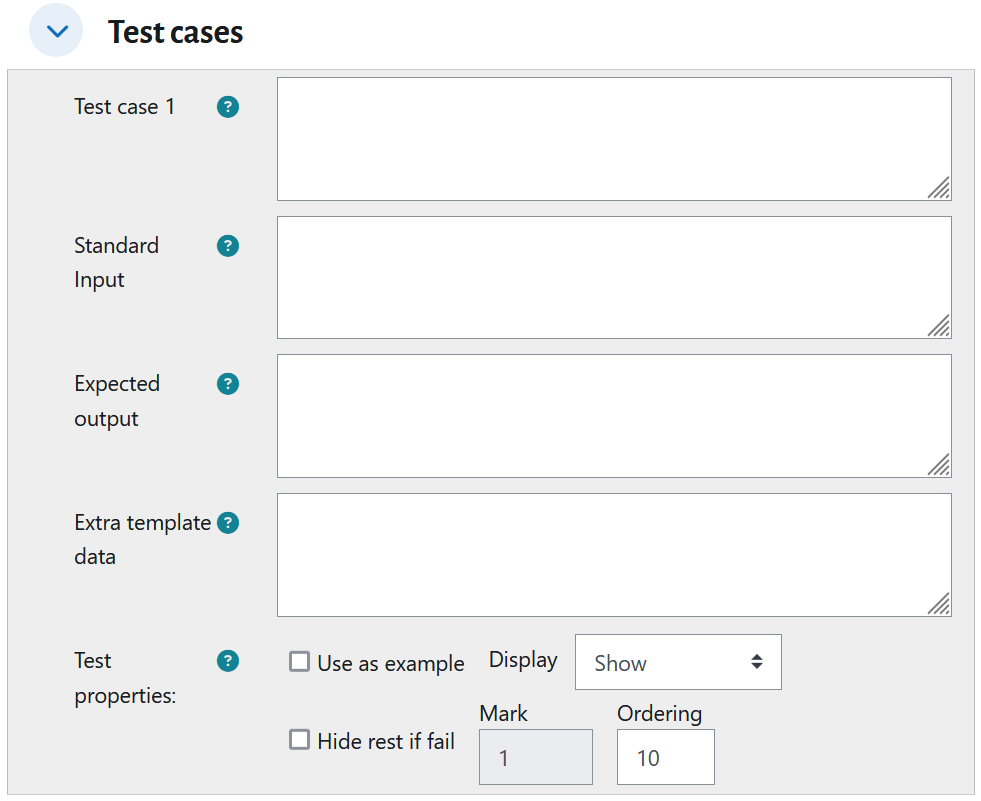
When the student submits their code, CodeRunner tests the code with a set of test cases. The simplest test case is to define an input (if any) and the expected output. Then, CodeRunner runs the submitted program with the given input and compares the result of the program with the expected output. If the output of the submitted program does not match the expected output, the student will not receive any marks for that test case. Each question can have several test cases, with associated marks.
Therefore, the main step in setting up a CodeRunner question is to define the test cases (Figure 34.1). The most important elements here are the Standard Input and Expected Output, which determine what the input and output of the program should be.
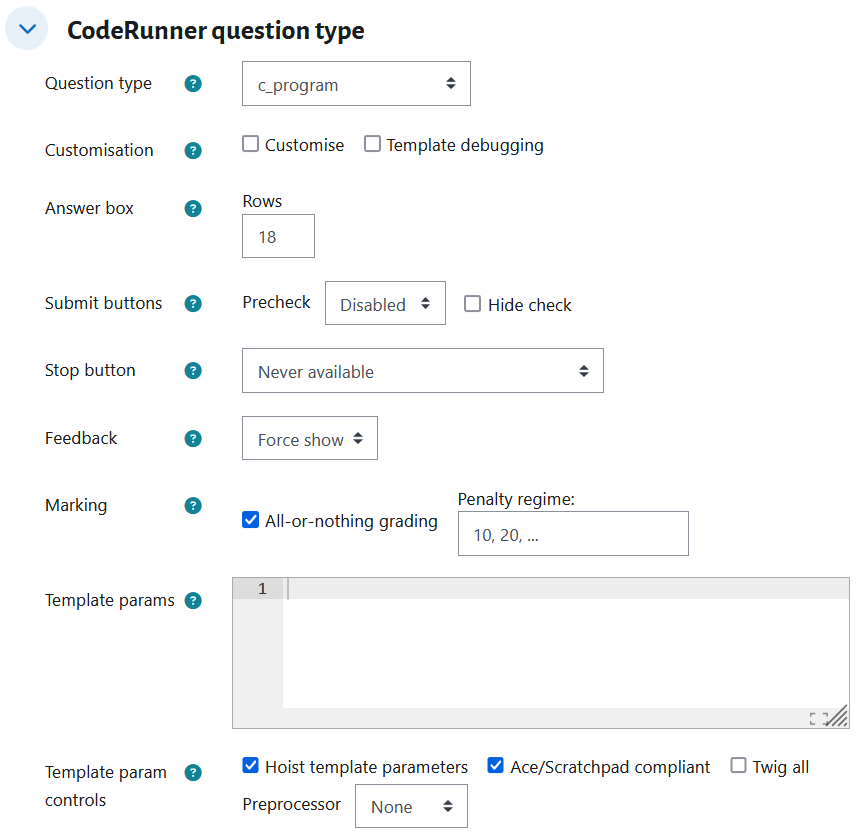
In addition to test cases, there are many adjustments that can be made, as can be seen in Figure 34.2. The most important ones — Question type, Precheck, Check and Penalty, Customisation, Template, and Support Files — are described in this section. Other options are also available in CodeRunner, and we recommend consulting the CodeRunner documentation for detailed information.
Once the question is configured, it can be previewed and tested like any other quiz in Moodle. It is strongly recommended that, after the quiz is completed by students, the submission is reviewed for common errors and misconfigurations. This allows you to adjust the questions for the next cohort.
Question Type
Description: The Question type specifies the programming language used for the assignment. You can select one of the predefined languages from the drop-down menu. However, any language can be used once it is installed on the CodeRunner’s server.
Recommendation: See the CodeRunner documentation on supporting or implementing new languages.
Check and Penalty
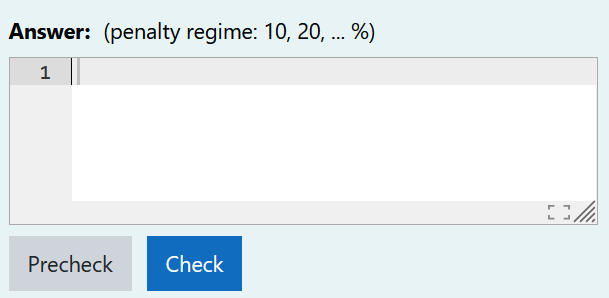
Description: In addition to Precheck, there is also a Check button in the answer form, as shown in Figure 34.3. This button allows students to verify if their answer is correct. A penalty regime can be defined to specify whether marks should be reduced if students change their solution after each Check. The Check button can be disabled by selecting Hide Check (Figure 34.2). Then, students would have only one chance to submit their code.
Recommendation: Using the Check button gives the student the opportunity to learn from their mistakes and improve their submission. However, depending on the assignment, you may want to hide this button and allow only one attempt.
Customisation
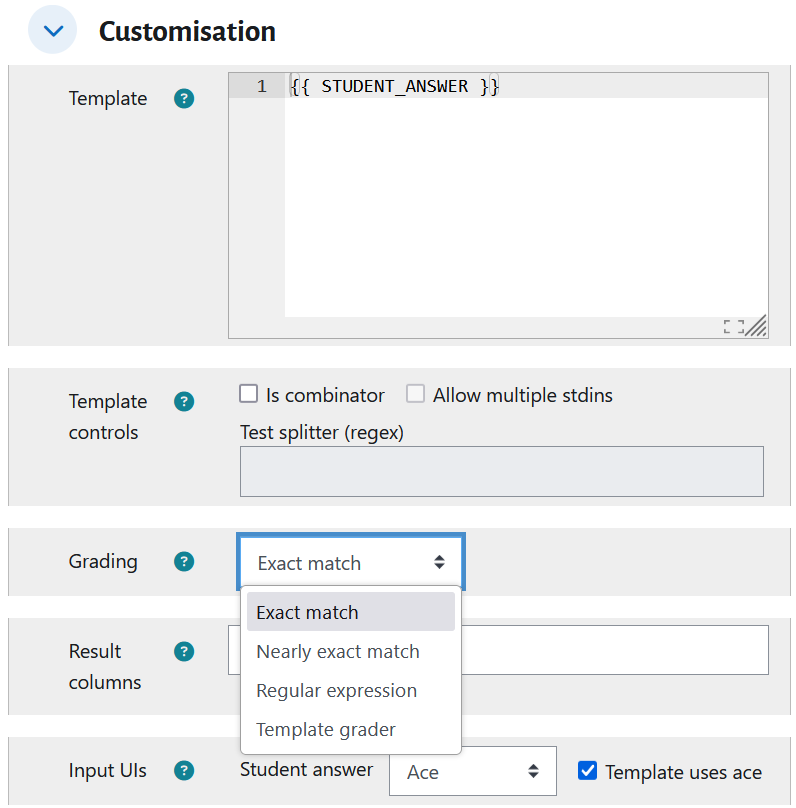
Description: One of the powerful features of CodeRunner is that it enables customisation by selecting the Customise option (Figure 34.2). This will allow more complex customisation of the question, as shown in Figure 34.4. A useful option in customisation is Grading, which allows you to define how you want the output to match the expected output. It can be an Exact Match, a Nearly Exact Match (ignoring extra whitespaces and case differences), a Regular Expression, etc.
Recommendation: For most of our assignments, we use Nearly Exact Match, as we don’t want to penalise students for extra spaces or case mismatches in their output. In some cases, Regular Expressions are used to focus only on a specific output without paying attention to other text in the output.
Template
Description: The template (Figure 34.4) allows more complex customisation of the question by defining a script to run for each test case or all test cases. The script defines how the student’s answer should be evaluated. This enables more advanced evaluation of student submissions, such as assessing code style, enforcing specific language features, or analysing code structure. In this way, the template provides full flexibility to define the automated marker according to the requirements of the assignment.
Recommendation: Use this customisation when the evaluation goes beyond checking for correct input and output, for example, when verifying that a student has used an array, a specific function, or other required programming constructs.
Support Files
Description: When additional files are needed to execute and evaluate a student’s solution, they can be uploaded through the Support Files section of CodeRunner.
Recommendation: This section is useful for providing any supplementary files required for the assignment, such as additional C++ or Java classes, or even a Java parser for more detailed analysis of the student’s code.
Our Experience
At the University of Strathclyde, CodeRunner has been integrated into several programming modules, including C, Python, Java, and SQL. Below are some examples of how it has been used.
Basic Input/Output Evaluation
CodeRunner is used to verify whether a program produces the correct output. Questions can be configured to require either a complete program or a specific function. When the output varies depending on the input, all relevant test cases are included in the question. See the Moodle XML file CodeRunnerBasic.xml for an example.
Use of Specific Programming Constructs
In some cases, the goal is to ensure that students apply a particular programming feature. For example, in a loop evaluation task, it may be necessary to check that a student uses a while-loop rather than a for-loop. This can be enforced using the Template configuration. Depending on the programming language, the template script may be relatively simple, such as:
The Template configuration can be significantly more complex. See the Moodle XML file CodeRunnerConstruct.xml for an example.
Evaluation of JUnit Implementation
In some assessments, it was necessary to evaluate students’ understanding of JUnit within Java programming. This was achieved by using a CodeRunner template developed specifically for this purpose.
Evaluation of SQL Queries
CodeRunner makes it easy to design assessments involving SQL queries. The database required for the question can be created using SQLite and uploaded via the Support Files section of CodeRunner. Each query is then tested by comparing its output against the expected result. Since the order of rows in SQL query results is not guaranteed, students should either be instructed to use an ORDER BY clause on a specific attribute, or the template script can be configured to automatically sort the output of SELECT statements before comparison. See the Moodle XML file CodeRunnerSQLQueries.xml for an example.
Evaluation of SQL Database Creation
CodeRunner can also be used to assess students’ ability to design and create SQL databases. Test cases can be written to check whether tables are defined correctly, including the correct definition of primary keys, foreign keys, and data types. INSERT statements can be included in the test case to verify whether the student’s tables enforce the required constraints. Since invalid inserts produce errors instead of standard output, a script must be added to the CodeRunner template to capture and display these errors as the student’s output. See the Moodle XML file CodeRunnerSQLCreate.xml for a simple example.
Conclusion
Automated marking provides several important benefits in the context of programming education. It can significantly reduce the workload for examiners and provide immediate feedback to students. Additionally, automated marking can transform the learning process into something more engaging and enjoyable. The instant feedback and challenge-response style of interaction create a game-like environment that encourages students to experiment, stay motivated, and actively engage with the material.
Automated marking is particularly valuable for students who find it difficult to ask questions or seek help during class. By receiving immediate and private feedback, these students can identify and correct their mistakes without needing to approach an instructor directly.
It is also especially beneficial for students from non-computing disciplines who are learning programming as a secondary skill. Without feedback, many of these students struggle to notice errors in their code, which can lead to misunderstanding. Automated marking ensures that even formative exercises provide clear guidance, helping students gain confidence and progress more effectively.
Finally, the high level of customisation offered by tools such as CodeRunner allows educators to design assessments ranging from simple input and output checks to more advanced tasks, such as evaluating specific programming constructs or features, code structure and style, or database creation. This adaptability makes automated marking a powerful tool for supporting diverse learning objectives.